How Differential Pay and Non-Billable Time Work
Last updated: August 26, 2026
1. Strategy: Why Differential Time Matters
Differential time allows practices to recognize the different kinds of work clinicians do every week. Direct therapy, drive time, training, weekend coverage, meetings, and cancellation blocks all place different demands on a clinician’s schedule and energy. Differential pay makes it possible to acknowledge those differences in a structured and transparent way.
A thoughtful differential pay structure helps you:
Value training time by ensuring new staff are supported and compensated while they’re learning
Acknowledge the extra effort that comes with weekend or hard-to-staff hours
Recognize non-clinical duties such as documentation, phone calls, or care coordination
Provide predictable compensation for drive time and travel
Create clarity for both leadership and clinicians about how each type of work is treated
The goal is fairness, transparency, and trust—not penny-pinching. Differential time helps clinicians feel confident that every type of work they put in is acknowledged appropriately.
2. Paycodes in Alpaca
Related article:📄 Appointment type vs. pay code
Paycodes determine how a clinician is paid for a specific appointment, regardless of whether the appointment is billable. Practices can customize these to match their philosophy around training support, travel compensation, and recognition of specialty hours.
Clinical
Used for direct service or supervision. This is the core clinical work your team is trained for.
Non-Clinical
Used for admin tasks, documentation, care coordination, preparation, and other essential behind-the-scenes work that supports high-quality services.
Training
Used when a clinician is onboarding, shadowing, or building new competencies. Training is an investment in the clinician’s long-term clinical skill and confidence.
Drive Time
Used for compensated travel between clients or community locations.
Weekend
Used when you choose to offer elevated pay for Saturday or Sunday work, reflecting the extra flexibility clinicians often provide to support families’ schedules.
3. Appointment Types: How Alpaca Handles Different Kinds of Events
Where paycodes determine compensation, appointment types determine how a session behaves inside Alpaca—such as whether it needs a note, whether leadership approval is required, and whether it’s included in payer payouts.
Billable
Tied to a CPT code
Requires a signed note
Appears on the practice’s payer payout
Can be paid using any paycode (for example, billing a session but compensating a new staff member at a training rate during overlaps)
Non-Billable
Used for cancellations, prep blocks, team meetings, or admin time
Requires approval from practice leadership
Does not appear on payer payouts
Can still be paid at any paycode (for example, paying clinicians at their clinical rate after a late cancellation)
Leave Type
Used for sick leave, vacation, or any paid/unpaid leave you configure
Only affects payroll
Complies with state-specific sick or protected leave requirements
No clinical notes or CPT codes required
4. How Appointment Types and Paycodes Work Together
You can think of it this way:
Appointment Type = how the session behaves in the platform
Paycode = how the clinician is compensated
This gives practice owners complete flexibility while keeping things transparent for staff.
Example 1: Onboarding overlaps
Appointment: Billable (with CPT)
Paycode: Training
Why: The service is still delivered, but the clinician is being supported during onboarding.
Example 2: A same-day cancellation
Appointment: Non-Billable
Paycode: Clinical
Why: You want to recognize the clinician’s time, even though the family canceled.
Example 3: Weekend coverage for a family
Appointment: Billable
Paycode: Weekend
Why: This acknowledges the additional flexibility clinicians provide to families outside the Monday–Friday routine.
Example 4: Travel between homes
Appointment: Non-Billable
Paycode: Drive Time
Why: Clinicians are compensated fairly for the time spent traveling.
This structure provides both financial clarity and clinical fairness.
5. Using the Scheduler in Alpaca
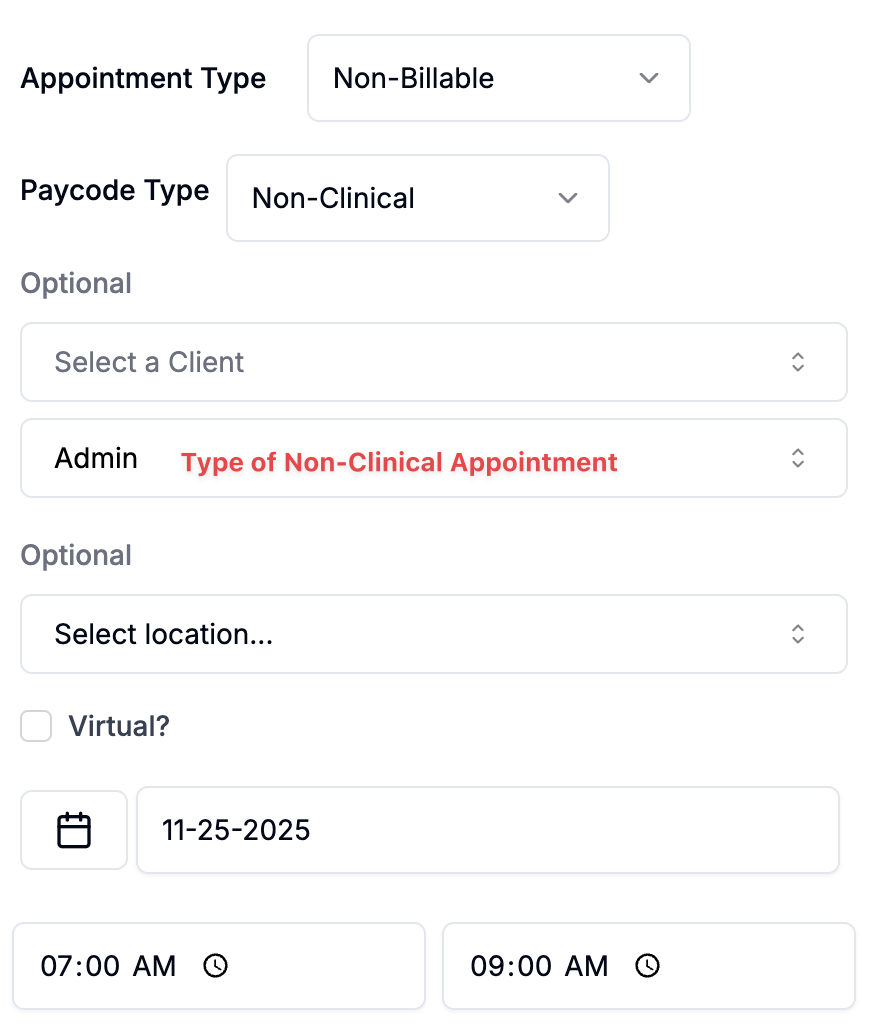
In the scheduler (as shown in the screenshot), you choose:
Appointment Type (Billable, Non-Billable, Leave)
Paycode (Clinical, Non-Clinical, Training, Drive Time, Weekend)
Client, CPT code, location, date/time, and provider
This allows you to design a scheduling and payroll system that is:
Fair to clinicians
Transparent and predictable
Flexible enough to support onboarding, cancellations, travel, and weekend needs
Aligned with the way your practice delivers care
6. Best Practices for Practice Owners
Make training meaningful
Training is one of the most important investments in a clinician’s long-term career. Using a dedicated Training paycode signals that learning is valued, protected, and compensated.
Keep non-clinical work visible
Documentation, communication, and coordination are essential to high-quality ABA services. Using Non-Clinical paycodes helps clinicians feel recognized for this work.
Use a consistent structure
Clear policies help clinicians understand how each hour is treated and allow them to plan their schedules with confidence.
Consider using weekend differentials to increase flexibility
Weekend differentials are often appreciated because they make it easier for clinicians to support families outside the standard school-day schedule.
Communicate the “why” to your team
A short explanation of your paycode structure—what each code means and why it exists—builds trust and reduces confusion.
Closing Thoughts
Differential time is about fairness and clarity. Clinicians take on many types of responsibilities, and each deserves to be recognized appropriately. Alpaca gives you the flexibility to ensure that training, travel, clinical work, administrative tasks, and weekend coverage are all acknowledged in a way that feels consistent, transparent, and supportive.
If you’d like help setting up a differential pay structure that aligns with your practice’s values, our team is here to support you.