The difference between appointment type vs. pay code
Last updated: August 10, 2026
An appointment type describes the work. A pay code decides how it’s paid. They are
set on the same screen and they are not the same field.
The appointment type
Who can do this: anyone who can edit appointments; changing pay rates needs the
pay-rate permission.
Where: Schedule → open a non-billable appointment.
The six pay codes
Signed Billable Hours · Training Hours · Admin Hours · Drive Time ·
Weekend · Unpaid Leave
A worker can hold a different rate for each. That’s why the pay code matters more than
the type.
What Alpaca picks for you
When you create a non-billable appointment, the pay code is set from the type:
Appointment type | Default pay code |
|---|---|
Training | Training Hours |
Travel | Drive Time |
Everything else — Admin, Materials Management, Clinical Programming, Staff Engagement, Client Family Engagement, Internal Meetings, Late Client, Consultation, Diagnosis Intake, RBT Interview, Nonbillable Appointment | Admin Hours |
A leave type marked unpaid | Unpaid Leave (overrides everything) |
Billable appointments default to Signed Billable Hours.
So eleven of the fourteen types are paid identically. They differ in your reporting,
not on the paycheck.
Overriding the pay code
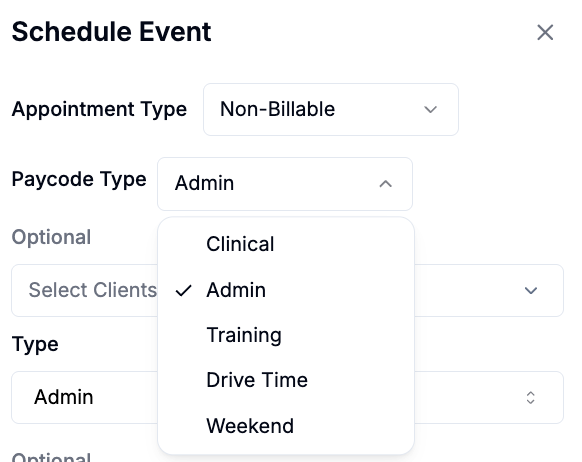
You can set the pay code by hand, and it sticks — Alpaca won’t re-derive it from the
type.
The case that matters: clinical work that a payer won’t reimburse. A session the
insurer denied, or supervision outside an authorization, is non-billable but it is
still clinical work. Set the pay code to Signed Billable Hoursand it pays at the
worker’s billable rate instead of their admin rate.
Set the override on the series if the work recurs, otherwise you’re fixing it week
after week.
If the hours look wrong
Hours appear but the pay is $0. The worker has no rate for that pay code. Check
their rates before assuming the appointment is broken.
Changing the type didn’t change the pay code. Once a pay code has been set by hand
it stays put. Set it back manually.
Overlapping appointments paid less than expected. Overlapping time is counted once
per pay code. This is deliberate — it stops double-paying the same hour.
PTO shows on the paycheck at the billable rate. Expected — paid leave is priced at
the billable rate.