Recurring appointments
Last updated: August 10, 2026
A recurring series is a pattern, not a pile of appointments. You describe the
pattern once — who, when, how often, until when — and Alpaca generates the individual
appointments from it. Editing the pattern and editing one appointment are different
actions with different consequences.
Where to find it: sidebar → Organization → Schedule → create an appointment
and make it recurring, or open any appointment that’s already part of a series.
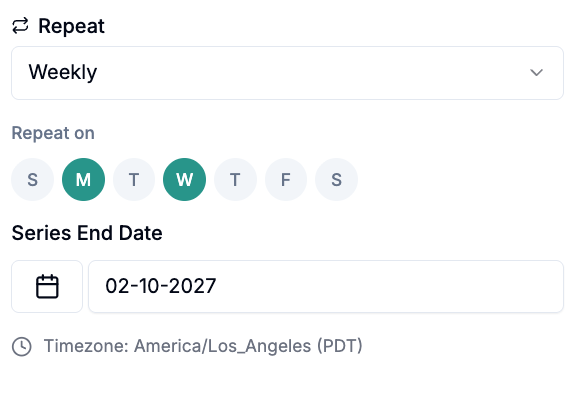
What a series is made of
Part | What it does |
|---|---|
Frequency | Weekly or every two weeks. Those are the only two options |
Time slots | One or more per series. Each slot carries its own day, time, clinician, and location or meeting link |
Start and end date | The window the pattern generates into |
Appointment type | The CPT code, or the non-billable type and its pay code |
What each edit option does
Open a recurring appointment and change something, and you’ll be asked how far the
change should reach:
Option | What it changes | What it leaves alone |
|---|---|---|
This event | Only the occurrence you opened | The pattern, and every other occurrence |
This and following events | Splits the series in two. The original stops the day before; a brand-new series starts on this date and carries your changes | Everything before this date |
All events (excluding appointments before ) | Every occurrence from today forward | Anything already in the past |
Deleting offers the same three, with the last one worded All current and future
events.
Calendar appointments behave differently. For a plain calendar entry, the last
option reads All events (including past events) — and it means it. For client
appointments, “all” never reaches the past.
Why an option is sometimes missing
“This event” is gone. You changed the frequency or the slot structure. A single
occurrence can’t carry a new recurrence pattern, so that scope stops making sense.
Only “All events” is offered on a non-billable appointment.The series has already
started and its hours are in play for payroll.
What Alpaca protects
Editing a series does not reach into work that’s already been done or paid:
Appointments that already have a session note are left alone. Regenerating a
series never destroys a documented session.Non-billable time already counted in payroll is immutable.Finalized rows always;
approved or verified rows once their payout period has closed.
If a change seems not to have applied to some occurrences, this is usually why — and
it’s protecting you.
Biweekly series and which week they land on
A split preserves the every-other-week alignment: the new series keeps landing on the
same weeks the original did.
The exception — if you change the frequency during the split, the new series re-anchors
to the split date. So converting weekly → biweekly mid-series may land on the opposite
week from what you expected. Check the first two generated occurrences.
Why something looks wrong
“I edited the series and one appointment didn’t change.”
It already has a session note. Edit that one directly.
“I changed the clinician and only some appointments updated.”
The clinician lives on the time slot, not the series. If the series has several
slots, you changed one of them.
“I picked ‘this and following’ and now I have two series.”
Expected — that’s what the option does. The original is truncated and a new one starts
at your date.
“Deleting the past didn’t work.”
For client appointments, “all” never reaches past occurrences. Delete those
individually.
“My biweekly series flipped to the wrong week.”
You changed the frequency during a split, which re-anchors it. See above.
“I deactivated a series and can’t turn it back on.”
There’s no reactivate. Recreate the series.
Related
What’s new
2026-08-09 — Article published.