Salary vs hourly workers
Last updated: August 25, 2026
Every worker on Alpaca Payroll is either salaried or hourly. This article explains how to set that, what changes on the Payroll page, and the questions that come up most often — mainly around paid time off and overtime.
Setting the compensation structure
Open the worker's profile from My Team.
Find the Pay Rates card and edit it.
Choose a Compensation Structure: Salary or Hourly.
Set Employee Time Classification — Full Time or Part Time. This is separate from salary/hourly, and is what leave policies scoped to full-time staff key off.
Fill in the rate fields that appear, then save.
The structure decides which fields you see. You cannot set both a salary and hourly rates for the same worker at the same time.
Hourly workers
An hourly worker has five rate fields:
Clinical ($/hr) — direct client sessions
Training ($/hr)
Admin ($/hr)
Drive Time ($/hr)
Weekend ($/hr)
Their pay for a period is the hours in each category multiplied by that category's rate. Any category with hours but no rate is flagged as a Zero Rate warning on the Payroll page — that is Alpaca telling you a worker is about to be paid nothing for real work. Fill the rate in, or change the appointment type to one you do pay for.
Salaried workers
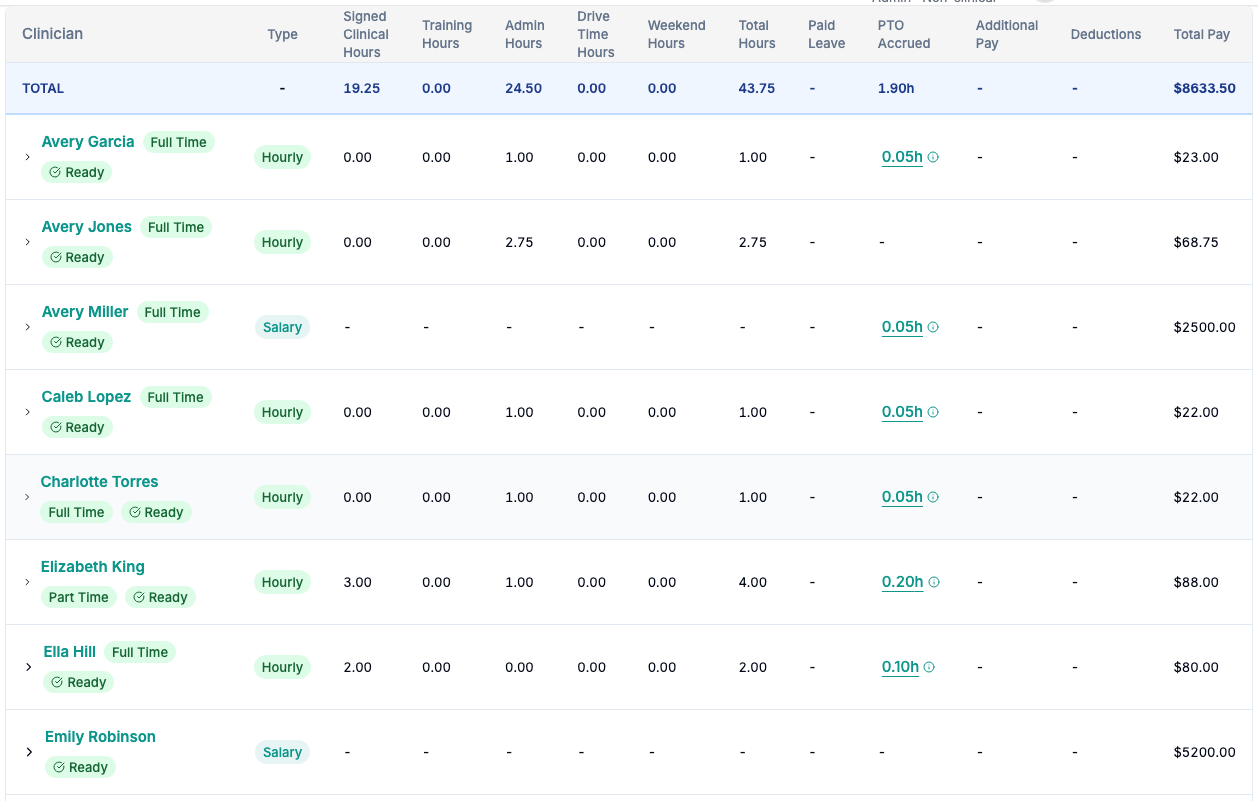
Hourly workers show hours in each category; salaried workers show a dash and their salary in Total Pay.
A salaried worker has a single field: Salary ($/year). Their pay does not move with their hours.
Their hours are still tracked and still shown on the Payroll page — you can see what a salaried BCBA actually delivered — but those hours are not what produces their pay. On a finalized period their salary is excluded from the recalculated hourly totals, which is why a salaried worker's row can show hours and no matching hourly amount.
Paid time off
PTO is always paid at the worker's clinical rate, and it is only added to pay for hourly workers. A salaried worker is already being paid through their leave, so adding PTO hours on top would pay them twice.
Salaried workers still accrue leave and still have a balance — see PTO & leave: accruals + the Leave Time tab.
Overtime
Overtime is driven by the Overtime Eligible flag on the worker's payroll contract, not by salary vs hourly. Most salaried roles are exempt and should have it off, but Alpaca does not assume that for you. See Overtime eligibility.
Changing between the two
Switching a worker from hourly to salary (or back) is a rate change like any other, and the timing matters — the new structure applies from its effective date, and work is priced by the rate in force on the day the service happened. If you are switching someone mid-period, read Worker rates and when to edit them first.
Still stuck? Email support@alpacahealth.io and we will take a look.