Understanding Your Insurance Costs & Patient Responsibility
Last updated: August 21, 2026
Your Alpaca Health parent portal shows exactly what you pay for your child's ABA sessions and what your insurance covers. This guide walks through the two screens that matter for money: Insurance & Costs (what you pay per visit, and how that changes as you meet your deductible and out-of-pocket maximum) and Billing & Payments (your per-session responsibility and your running balance).
You'll find both under Parent Tools in the left sidebar. The dollar amounts in the screenshots below are examples — your own plan's numbers will differ.
Open Insurance & Costs
The Insurance & Costs screen is a plain-language summary of what you owe for each visit right now and why.
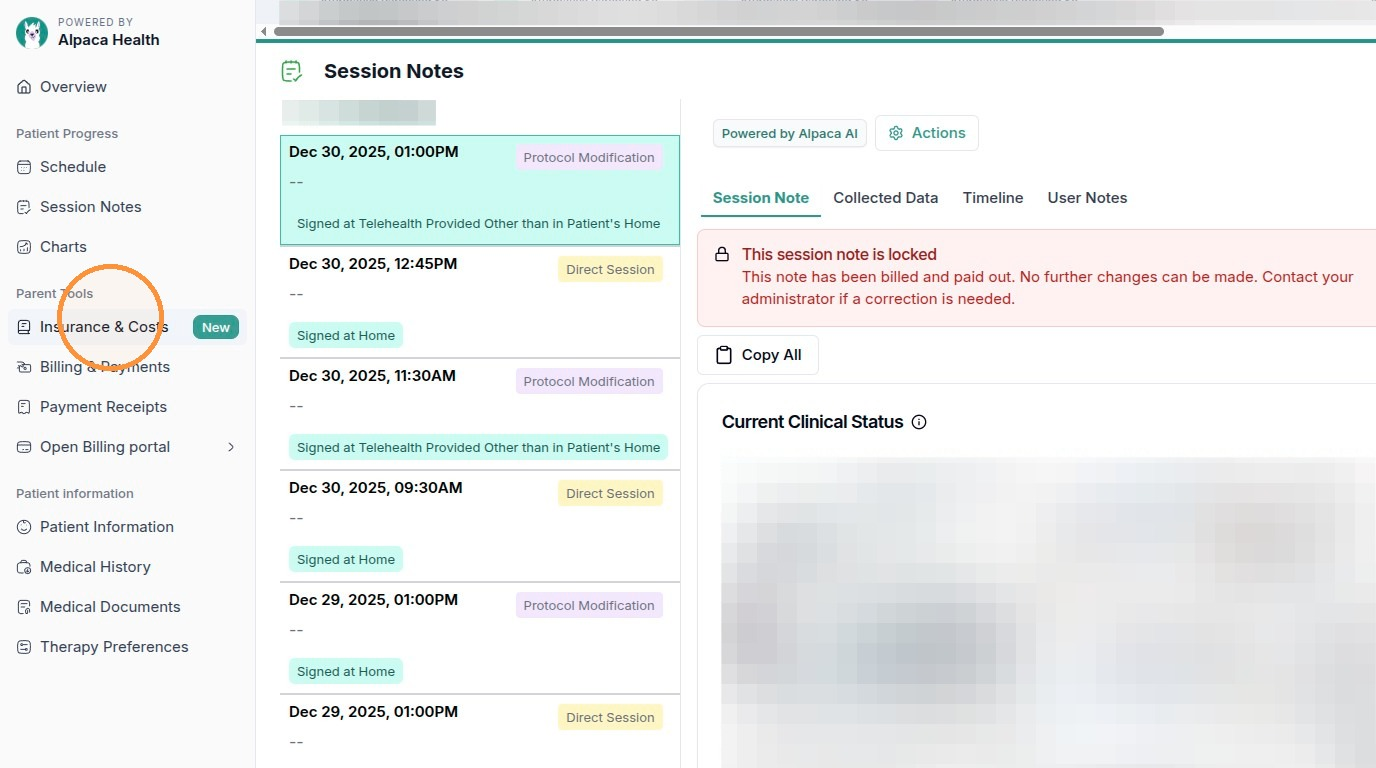
In the left sidebar, find the Parent Tools section and click Insurance & Costs. (It sits just above Billing & Payments and is marked with a New badge.)
Click Insurance & Costs under Parent Tools in the left sidebar.
The page opens with a short summary at the top: the plan it's reading from, a one-line explanation of what you pay per visit right now, and your current cost / visit in large type on the right.
The top of Insurance & Costs summarizes your current cost per visit.

Note:If your child has more than one insurance plan, the summary shows your primary plan. The figures update automatically as claims are processed, so the number can change during the year.
How your cost per visit changes through the year
Your cost for each session is not fixed — it moves through three stages as your spending adds up over the plan year. The How your costs change through the year strip shows all three stages, with a YOU ARE HERE badge on the one you're in now. Everyone moves through these in order:
Stage 1 · Before your deductible is met — you pay the full cost
Early in the plan year, before you've met your deductible, insurance hasn't started paying its share yet. You pay the full cost of each visit, and every dollar counts toward meeting your deductible.
In this stage the summary reads something like “Right now, you pay the full cost of each visit.” Stage 1, You pay the full cost, is marked YOU ARE HERE. The What these words mean cards below show your deductible and out-of-pocket max as Not met yet.
Stage 1: you pay the full visit cost, which counts toward your deductible.
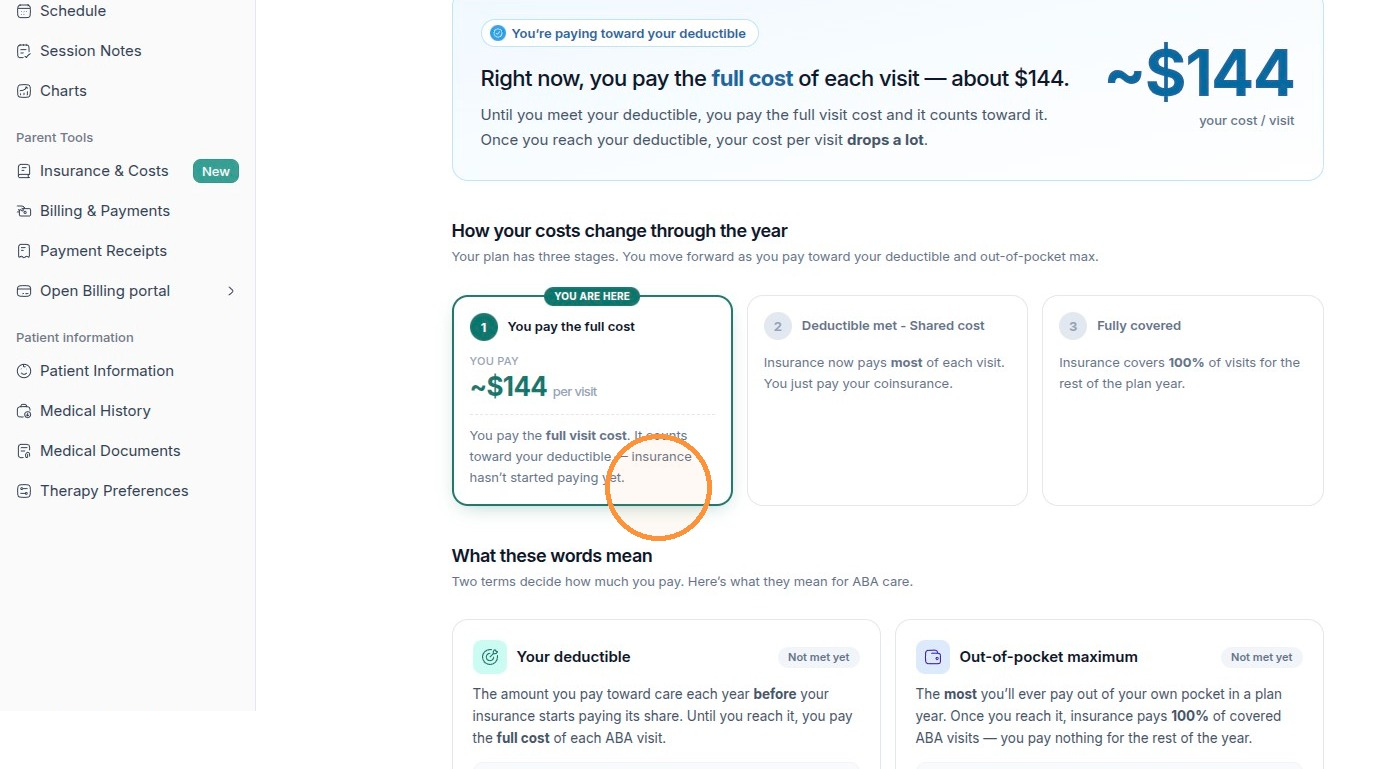
Note:Your deductible is the amount you pay toward care each year before insurance starts paying its share. Until you reach it, you pay the full cost of each ABA visit.
Stage 2 · Deductible met — you pay a copay (shared cost)
Once you've met your deductible, you move into shared cost. Insurance now pays most of each visit and you pay a smaller, predictable amount — usually a copay (or coinsurance) per visit.
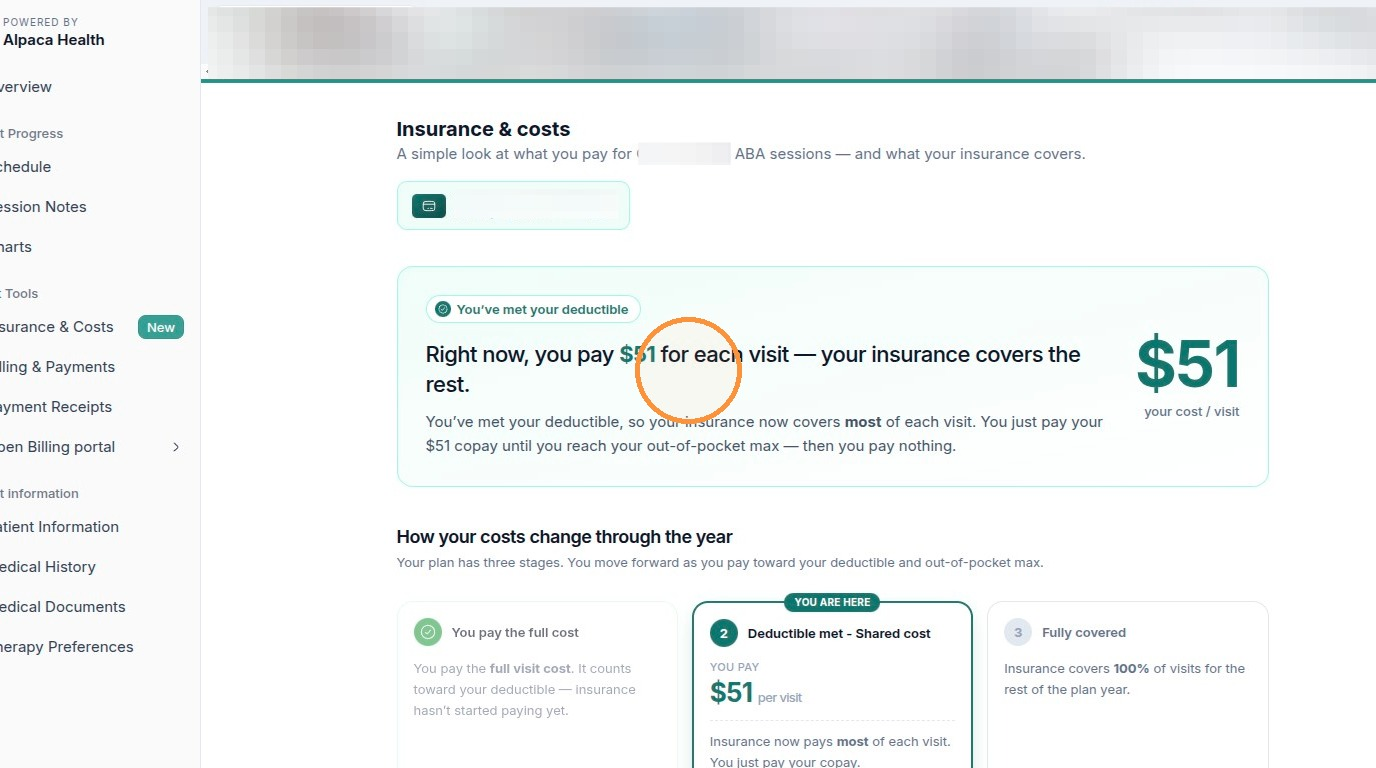
The summary now shows your per-visit copay (for example, “you pay $51 for each visit — your insurance covers the rest”), and Stage 2, Deductible met – Shared cost, is marked YOU ARE HERE. You keep paying this copay on each visit until you reach your out-of-pocket maximum.
Stage 2: your deductible is met, so you pay a set copay per visit.
Stage 3 · Out-of-pocket maximum met — fully covered
Your out-of-pocket maximum is the most you'll ever pay from your own pocket in a plan year. Every copay and coinsurance you pay counts toward it. Once you hit it, insurance covers 100% of covered ABA visits for the rest of the plan year.
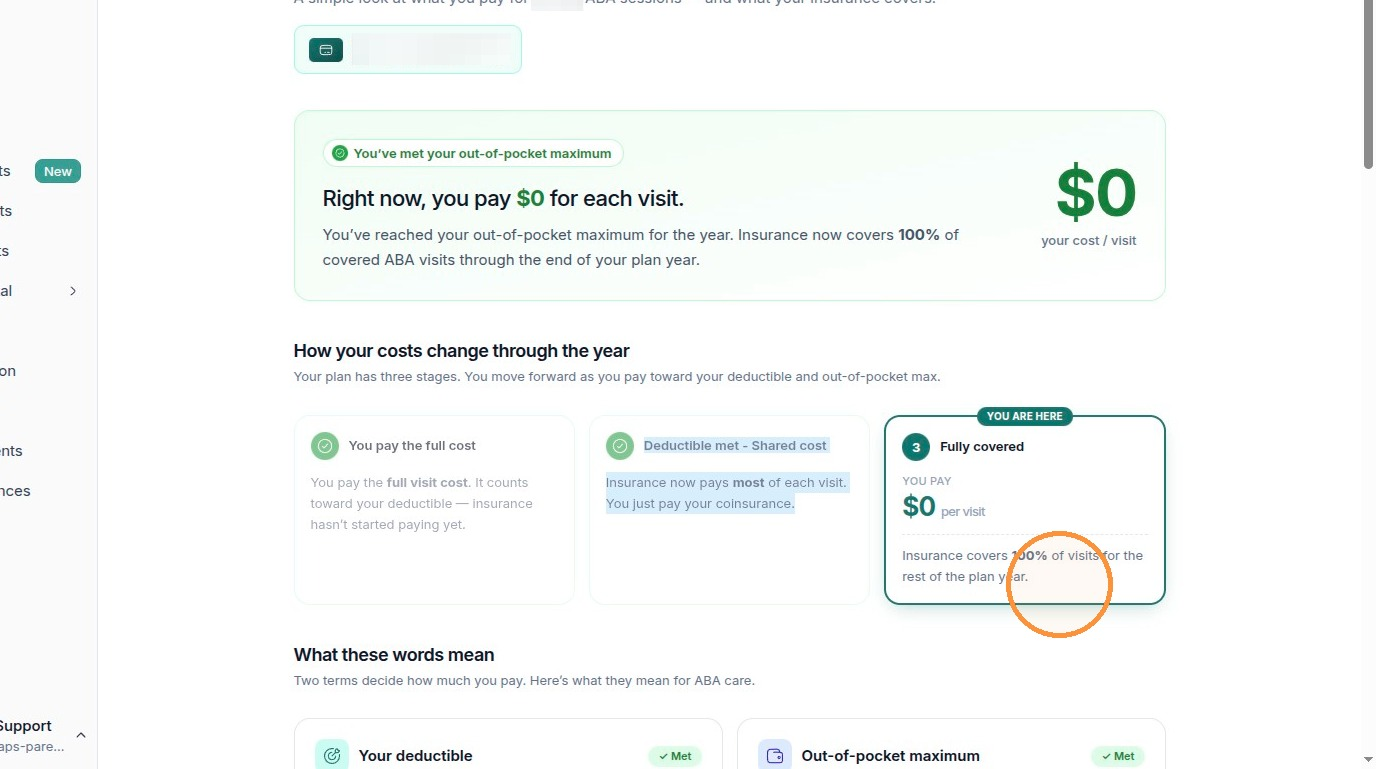
In this stage the summary reads “Right now, you pay $0 for each visit,” and Stage 3, Fully covered, is marked YOU ARE HERE. Both your deductible and out-of-pocket max show as Met.
Stage 3: you've met your out-of-pocket max, so covered visits cost you $0.
Heads up:Deductible and out-of-pocket maximum are not the same thing. You meet the deductible first (that moves you from full cost to a copay); the out-of-pocket max comes later and is what drops your cost to $0. These stages reset at the start of each new plan year.
Track your deductible and out-of-pocket progress
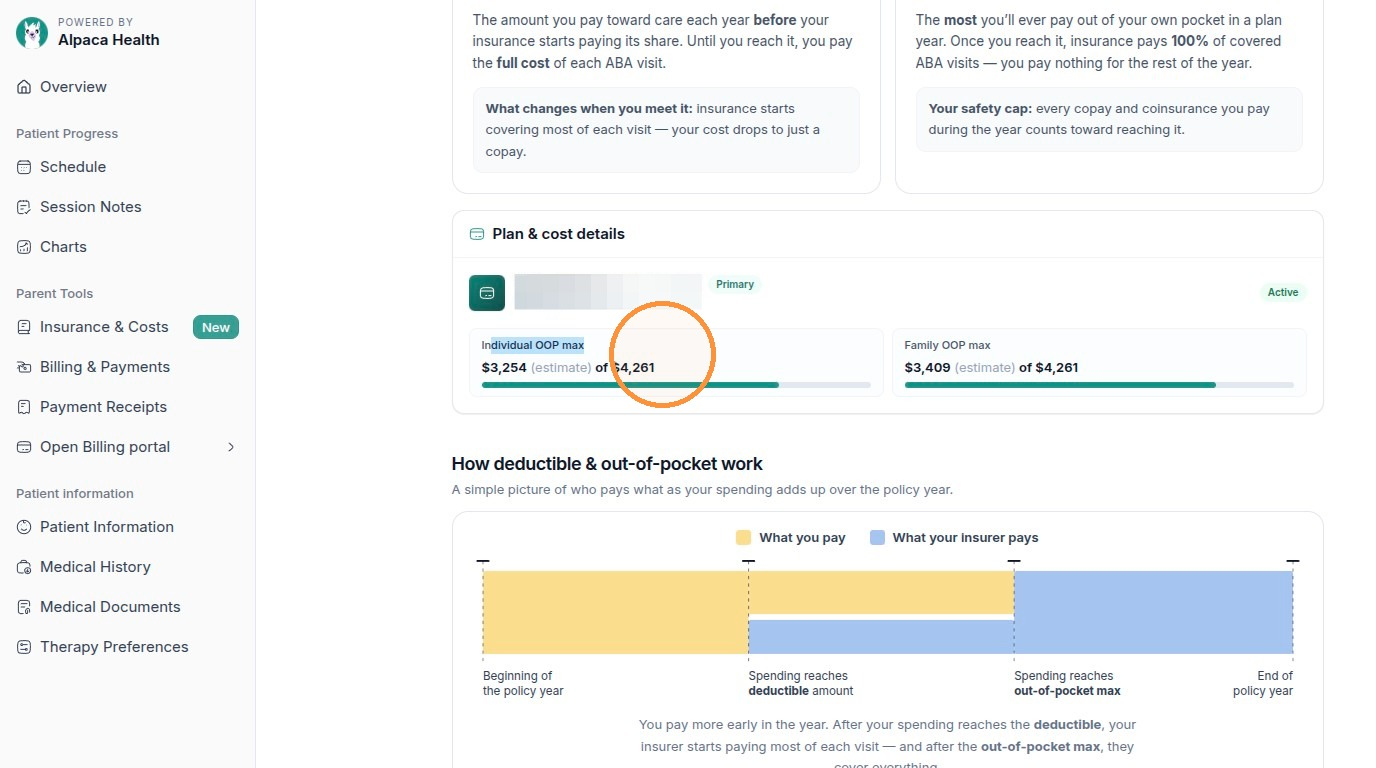
Scroll down to Plan & cost details to see exactly how close you are to each threshold.
The Plan & cost details panel shows your plan and progress bars for your Individual OOP max and Family OOP max (how much of each maximum you've reached so far). Below that, the How deductible & out-of-pocket work chart illustrates who pays what as your spending crosses the deductible and then the out-of-pocket max.
Plan & cost details: progress toward your individual and family out-of-pocket max.
Tip:Amounts labeled (estimate) are based on claims processed so far. They give you a good running picture but can shift as new claims come in.
See what you owe per session (patient responsibility)
The same Insurance & Costs page lists each past session with two numbers per line: the Billed amount (the full charge for the visit) and your Patient responsibility (your share after insurance). These will not always match — your responsibility depends on which stage you were in when the visit happened.
Scroll to the Past sessions list. Each row shows the date, the session type and CPT code (for example, Direct Session (97153)), the Billed amount, and your Patient responsibility. Sessions you still owe on are tagged Outstanding.
Past sessions: Billed is the full charge; Patient responsibility is your share.

Note:A $0.00 patient responsibility means insurance covered that visit in full — you owe nothing for it. A dollar amount is the portion that's yours to pay, which then appears on your balance under Billing & Payments.
Check your balance and payments
Your outstanding balance — the total of everything you still owe — lives on the Billing & Payments screen.
In the left sidebar under Parent Tools, click Billing & Payments (just below Insurance & Costs).
The top of the page shows Balance remaining — what's left to pay across all of your child's sessions — plus a breakdown of Total cost of care (your family's share after insurance pays its part), Paid so far, and Balance remaining. A progress bar shows how much you've paid off.
Billing & Payments: your total balance and how much you've paid off so far.

Tip: If Auto-Charge is on, each balance is paid automatically on its due date and Alpaca emails you 3 days before any payment. You can turn it off anytime using the Turn off button in the Auto-Charge banner.
Note:Balance remaining here is the sum of the outstanding Patient responsibility amounts you saw in the Past sessions list — it is your family's share, not the full billed amount.
FAQ's
Q: Why does my cost per visit keep changing?
A: Your cost moves through three stages as your spending adds up over the plan year. Before you meet your deductible you pay the full visit cost; once it’s met you pay just a copay; and once you hit your out-of-pocket maximum, covered visits cost you $0 for the rest of the plan year. The Insurance & Costs page always shows which stage you’re in with a “You are here” badge.
Q: A session shows a “Billed” amount but my “Patient responsibility” is different — why?
A: Billed is the full charge for the visit. Patient responsibility is only your share after insurance pays its part, so the two rarely match. A $0.00 patient responsibility means insurance covered that visit in full and you owe nothing for it.
Q: What is my “Balance remaining,” and do I have to pay it manually?
A: Balance remaining (on the Billing & Payments page) is the total of all your outstanding patient-responsibility amounts — your family’s share, not the full billed total. If Auto-Charge is on, each balance is paid automatically on its due date and we email you 3 days before any payment. You can turn Auto-Charge off anytime from the banner on that page.