4.3 Guide to Your Organization Specific Intake Form
Last updated: July 21, 2026
Every clinic in the Alpaca network gets its own dedicated intake form. This form ensures that all new families enter your practice through a single, consistent workflow that syncs directly with our backend systems. Below is a quick guide on how it works and how to make the most of it.
What the Intake Form Does
Your intake form is the front door for all new families in your organization. When a parent completes it:
1. The client is automatically created under your organization
Every submission routes to your clinic only. No other practices will ever see or receive these families.
2. Information flows directly into Alpaca’s backend systems
We track everything in real time, including:
• Contact info
• Insurance details
• Uploaded documents
• Consent and eligibility questions
This allows us to begin verification, eligibility checks, and document collection immediately.
3. Parents receive an invitation to the Parent Portal
Right after submitting the form, parents are emailed instructions to activate their parent portal account. This lets them upload any missing documents, complete additional paperwork, and receive updates from your practice.
4. Your team sees all incoming clients in one place
You always know who submitted, what’s still missing, and what’s required next for onboarding.
Where to Find Your Intake Form
Your unique form link was shared during onboarding. If you need it again, please navigate to the Referrals page to get the link.
We recommend sharing it by:
• Adding it to your website
• Including it in your email signature
• Sending it to new families after screenings or calls
• Saving it as a text template in your phone
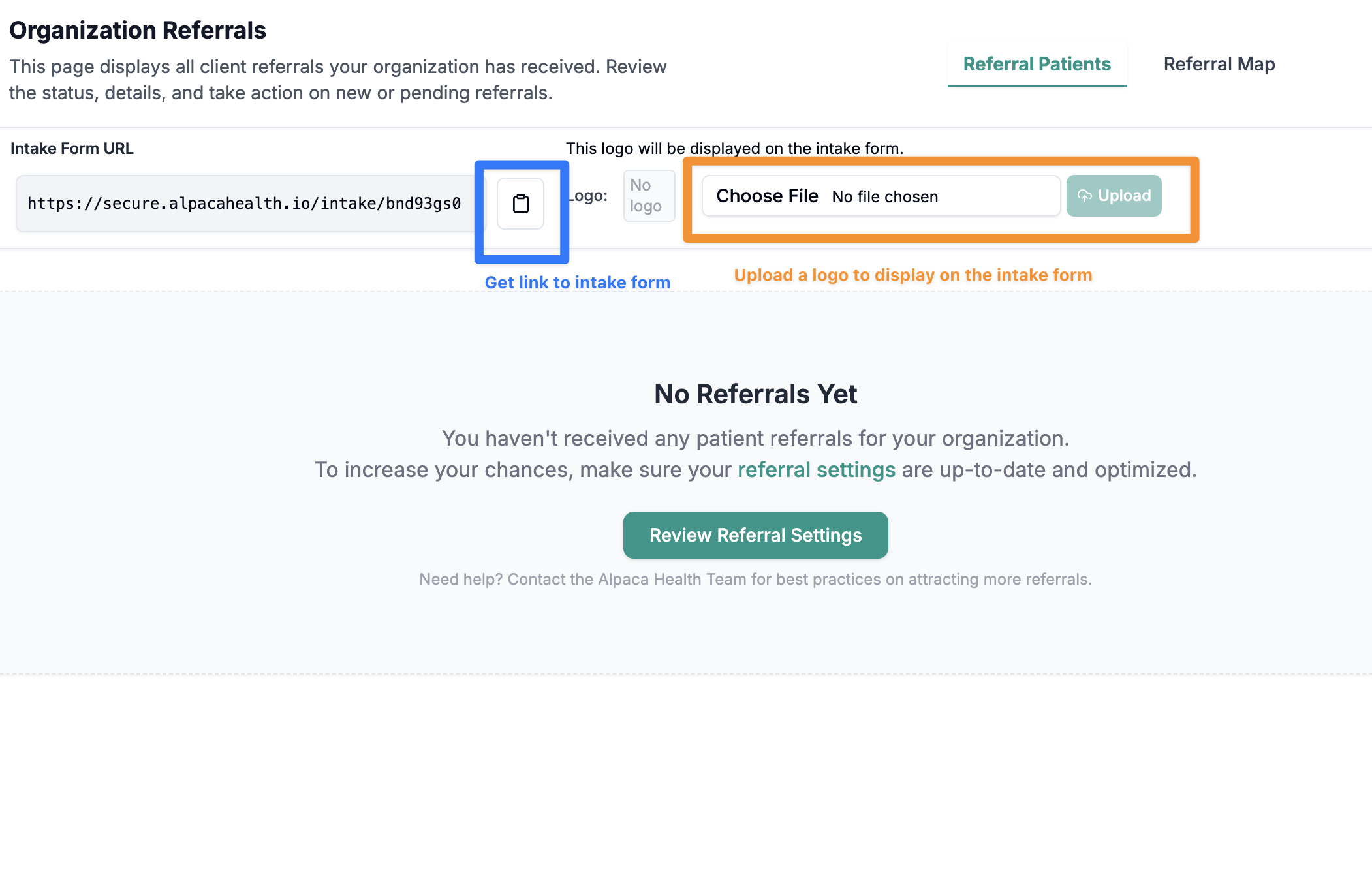
Adding Your Logo
You can customize your intake experience by adding your clinic’s logo.
Steps
Open your Alpaca dashboard
Click Referrals
Upload your clinic logo in the branding section
Your logo will appear on your intake form and on any referral-facing materials tied to your organization.
Benefits of Using Your Organization-Specific Intake Form
✔ No lost leads
All submissions are automatically tracked.
✔ Documents stay organized
Insurance cards, diagnosis paperwork, IEPs, and other uploads are tied to the client record from day one.
✔ Faster onboarding
Our team can begin eligibility and authorization work right away.
✔ A smooth parent experience
Their portal invite goes out automatically, reducing back-and-forth and helping families stay on track.
Best Practices
• Always send families your intake form first
• Encourage families to upload documents early
• Keep your logo updated in the Referrals section
• Update your branding if your clinic name or logo changes
If you’d like help customizing your intake experience or need your link resent, email support@alpacahealth.io anytime.