Using the Interval Timer for Differential Reinforcement
Last updated: December 17, 2025
Alpaca’s interval timer can support clinically sound differential reinforcement procedures while preserving the integrity of interval-based data collection.
This article explains how to use the interval timer when reinforcement delivery takes time and should not be included in the observation interval.
A note to keep in mind when using intervals
In Alpaca, intervals advance automatically to support continuous observation. When using differential reinforcement, it’s helpful to think about what time you actually want counted as observation time.
Intervals are intended to capture behavior during observation, not the time spent delivering reinforcement. In many differential reinforcement procedures (DRO, DRA, DRI, DRL), reinforcement can take time and may interrupt observation.
If reinforcement time were included in an interval, it could unintentionally be counted as:
absence of behavior
on-task time
a successful interval
To avoid this, clinicians can pause the interval timer during reinforcement and resume once observation can reliably continue. This helps ensure interval data reflect only true observation periods and remain clean and defensible.
Step 1: Set up your intervals
Before starting the session, configure the interval settings for the program or behavior target.
You will choose:
Interval length (eg, 1 minute, 5 minutes)
Time unit (seconds or minutes)
Interval type
Partial interval
Whole interval
Momentary time sampling
These settings define the observation window only.
Step 2: Start interval timing
By default, Alpaca intervals auto-start and auto-advance:
When one interval ends, the next interval begins immediately
This supports continuous observation without gaps
This default works well for:
Simple interval procedures
High-rate behaviors
Situations where reinforcement is brief (eg, verbal praise, token delivery)
Step 3: Pause the timer during reinforcement (when needed)
In many differential reinforcement systems, reinforcement:
Takes time to deliver
Requires transitions, setup, or a checklist
Interrupts observation
Examples:
Access to a preferred activity
Token exchange
Breaks or transitions
Caregiver-mediated reinforcement
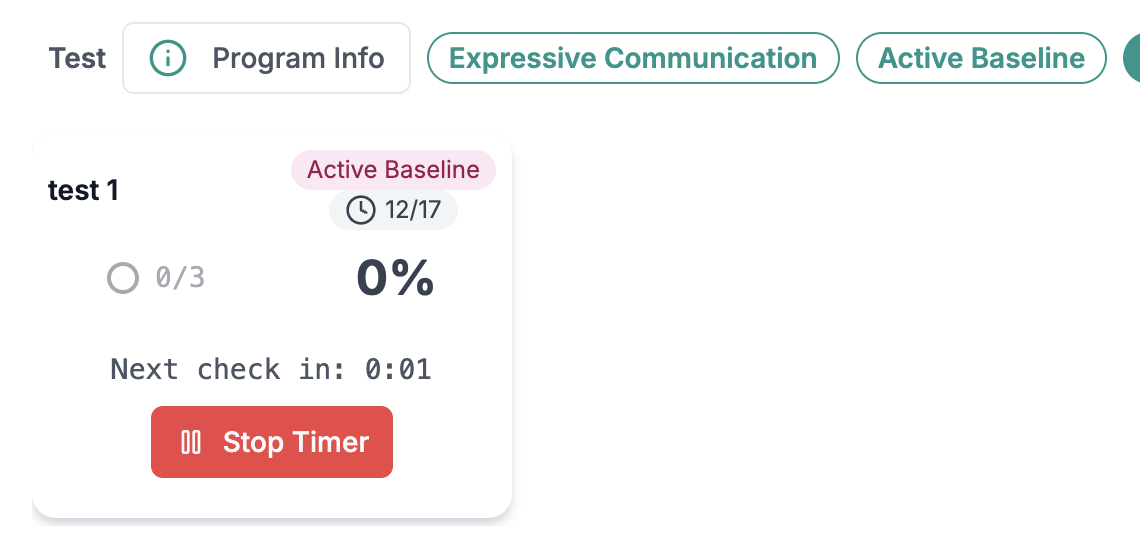
During data collection, you can click "Stop timer" to pause the intervals from advancing. Once you are ready for the observation window to begin again, you can click Stop Timer.
What to do in Alpaca
When reinforcement begins:
Stop or pause the interval timer
Deliver reinforcement
Resume the timer once reinforcement is complete and observation can reliably continue
Why this matters
Pausing the timer ensures that:
Reinforcement time is not counted as interval success
Data reflect only true observation periods
Interval outcomes remain valid and interpretable
Step 4: Use Auto Start Interval intentionally
Alpaca allows you to choose whether intervals resume automatically after being stopped.
Auto Start Interval = Yes
Intervals resume automatically
Best for:
RBT-led sessions
Highly structured programs
Simple reinforcement procedures
Auto Start Interval = No
Clinician manually restarts intervals
Best for:
Complex differential reinforcement systems
Reinforcement with multiple steps
BCBA-led sessions or caregiver training
This setting gives clinicians control over fidelity without forcing a single workflow.
How interval outcomes are recorded
Each interval resolves to a binary outcome based on the selected interval type:
Occurred / Did not occur
Met / Not met
Reinforcement delivery does not change how the interval is scored.
It only affects when the next interval begins.
Clinical best practices
Use shorter intervals early so learners contact reinforcement frequently
Pair DRO procedures with a taught alternative behavior when appropriate
Pause intervals whenever reinforcement meaningfully disrupts observation
Avoid scoring data while reinforcement is being delivered
Example workflow
Procedure: Whole-interval DRO
Interval length: 5 minutes
Interval runs for 5 minutes
Timer ends → clinician determines if criteria were met
If met:
Timer is paused
Reinforcement is delivered
Once reinforcement is complete:
Interval timing resumes
Next observation interval begins
Reinforcement time is excluded from interval measurement.
Key takeaway
Alpaca’s interval timer is built to reflect how differential reinforcement is implemented in real clinical settings:
Intervals = measurement
Reinforcement = consequence
Timer controls = fidelity protection
When in doubt, pause the timer during reinforcement to keep your data accurate and defensible.