Alpaca To-Dos: What Alpaca Handles on Your Behalf
Last updated: August 26, 2026
New to the To-dos page? Start with “Client To-Dos for the full tour of the queue, priorities, and the Client To-do types. This article picks up from there and focuses on what you can hand to Alpaca.
How a To-do becomes an Alpaca To-do
Every lands on your Open tab first. To hand one to Alpaca, work through its guided questions and choose the option that lets Alpaca take it:
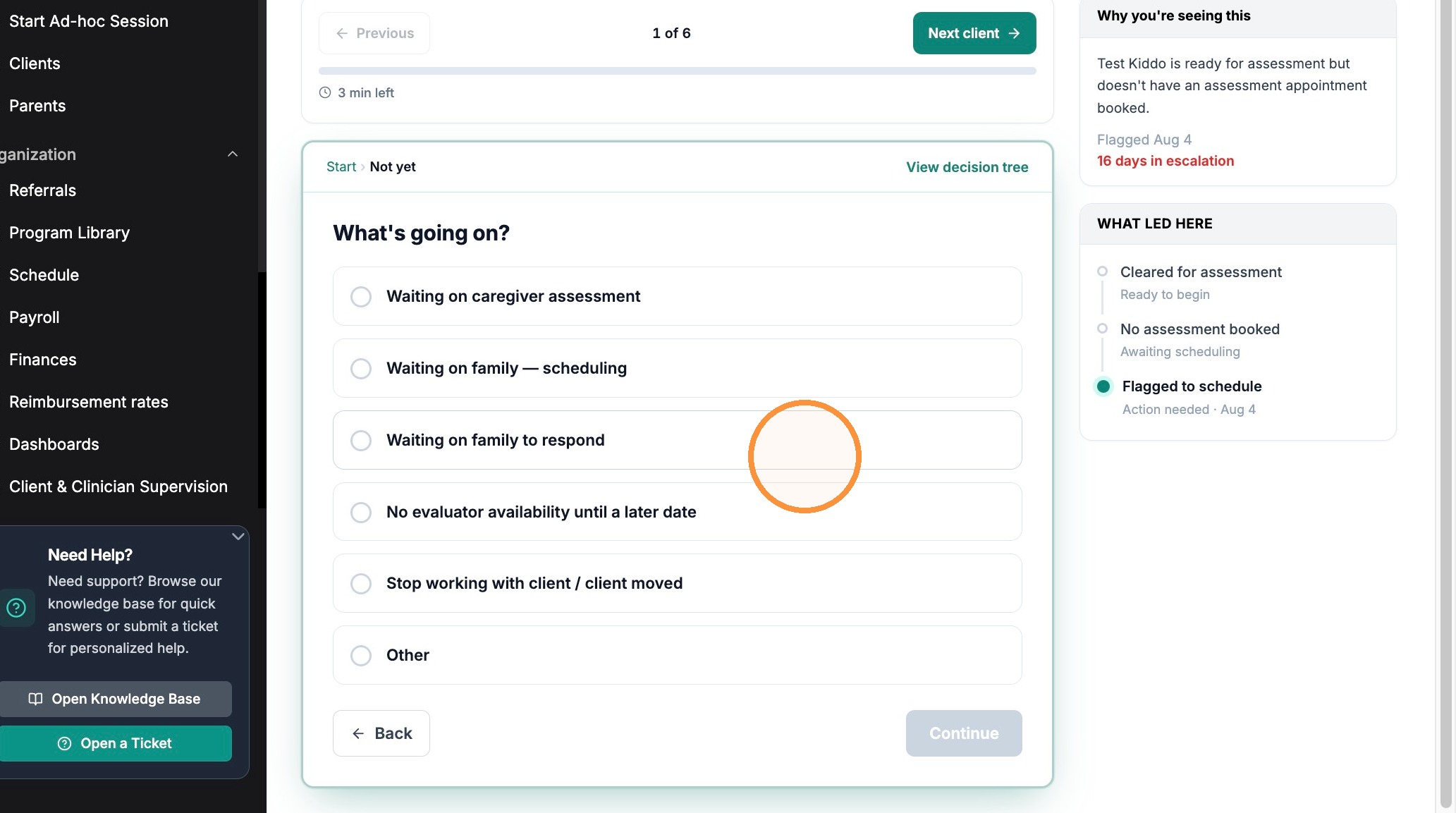
On the row, click Other options (or click the client to open the item, or click Start to walk the whole queue). A short guided Q&A opens.
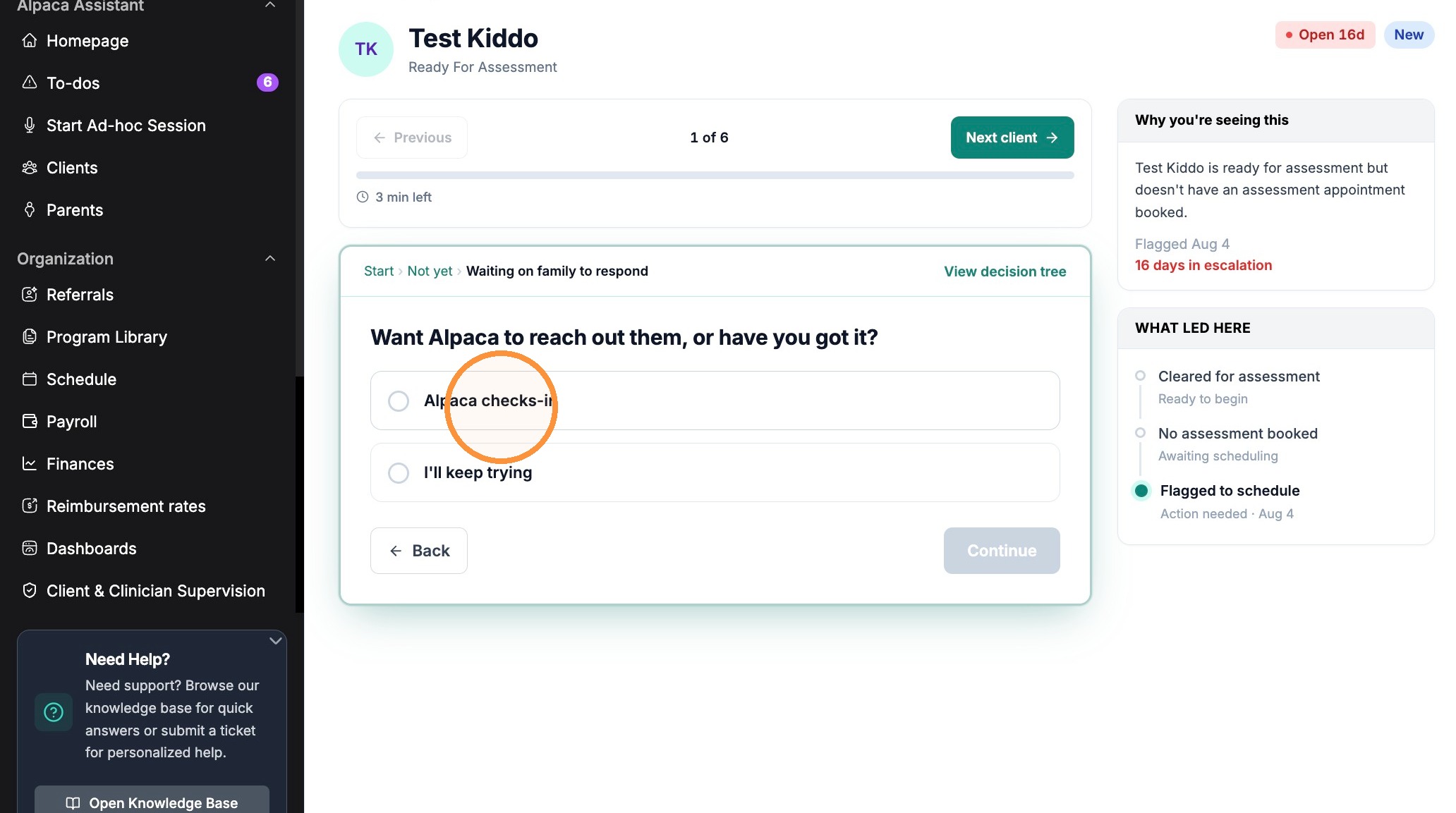
Answer each question. Every answer narrows down what’s really going on(for example, Start › Not yet → Waiting on family to respond) tracks where you are.
When you reach a question that offers to let Alpaca step in, choose the Alpaca option for example, Alpaca checks-in rather than the do-it-yourself option (I’ll keep trying).
Confirm on the final step (here, Mark Unresponsive). You’ll see “Escalation updated · Response submitted successfully.”
Tip: The right-hand panels — “Why you’re seeing this” and “What led here” — explain why the item was flagged.
Easy to confuse
Waiting on family — scheduling vs Waiting on family to respond: the first means you have a willing family but no booked time; the second means the family has gone quiet. Alpaca’s check-in offer appears on the “gone quiet” path.
Alpaca checks-in vs I’ll keep trying: only Alpaca checks-in hands the work to us. I’ll keep trying leaves the item on your Open list.
Other (free text): if nothing fits, choose Other and type at least ten words so the team has enough to act on, then Submit.
What you can hand to Alpaca
The options you see depend on the client’s situation — Alpaca only offers hand-offs that make sense for that item. The situations you can flag from the guided flow include:
Waiting on a caregiver assessment
Waiting on the family to schedule
Waiting on the family to respond — Alpaca can check in and re-engage them for you
Where it goes after you hand it off
It leaves Open and moves to the In progress with Alpaca tab, marked “Alpaca working on it.”
It closes on its own. When the resolves, the item closes itself and lands on the Completed tab; you don’t have to clear it.
It can bounce back to you. If it needs a decision only you can make, it returns to your Open list so it isn’t forgotten. That’s expected, not a glitch.
No duplicates. A client won’t generate a second open To-do for the same issue while one is already in progress with us.

Snoozed: pause an item instead of handing it off
If you don’t want Alpaca to take an item but you can’t act on it yet, snooze it. Snoozed items:
Move to the Snoozed tab from your Open list
Show their return date (for example, “back Aug 31” with the days remaining)
Return to your Open list automatically on that date — or sooner if the blocker clears first

FAQs
I handed a To-do to Alpaca — do I need to do anything else?
No. It’s on us until it resolves or comes back to your Open list. In the meantime you’ll find it under the In progress with Alpaca tab, marked “Alpaca working on it.”
An item I gave to Alpaca came back to my Open list. Why?
Either the next step is yours, or it needs a decision only you can make. Open the item and read “What led here” to see the latest history and your options.
Can I take a To-do back after handing it to Alpaca?
There’s no self-serve undo in the queue. If you handed something off by mistake, email support@alpacahealth.io and we’ll sort it out.
Still stuck? Reach out to support@alpacahealth.io.