CPT Over Utilization
Last updated: September 10, 2026
Who this is for: Schedulers, clinicians, and billing admins working with clients whose insurance enforces strict weekly or monthly authorization limits (e.g. TRICARE).
What this does
When you schedule or sign a session for a client with one of these insurances, Alpaca checks the session’s CPT code against how many authorized units that client has left for the relevant period. If the period’s limit is already used up, Alpaca raises a bypassable validation instead of silently booking the session as non‑payable.
How the limit is calculated per CPT
Different CPT codes are measured over different periods, matching how the insurance authorizes them. For TRICARE, for example:
CPT code | Period the limit applies to |
|---|---|
97151 (assessment) | Total units across the entire authorization — never divided into weeks or months |
97153 | Weekly |
97155, 97156 | Monthly |
Where the units for a period come from:
If the insurance provides a weekly or monthly breakdown for the authorization, Alpaca uses that breakdown directly.
Otherwise Alpaca calculates it from the total authorized units divided across the authorization’s periods.
What counts toward the limit
For the period covering the session’s date of service, Alpaca adds up:
Signed‑off billable sessions for that CPT (non‑billable sessions never count), plus
Scheduled appointments for that CPT that aren’t already represented by a signed note.
If that combined total has already reached the payer’s limit for the period, the validation fires.
Important — you can always finish scheduling a session that starts while allowance remains. A session that begins with any units left is bookable even if it runs past the cap; the clinic absorbs the overage rather than blocking care that’s already on the calendar. The validation only fires once a period has no allowance left at all.
What the message looks like
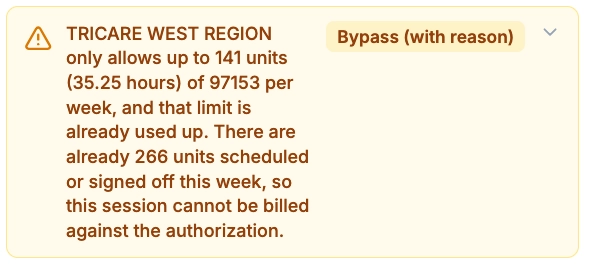
The validation names the payer, the limit, and what’s already using it — for example:
TRICARE only allows up to 24 units (6 hours) of 97153 per week, and that limit is already used up. There are already 24 units scheduled or signed off this week, so this session cannot be billed against the authorization.
It also lists the signed‑off sessions already counted toward the period so you can see where the units went.
What to do when you see it
Confirm the extra session is intended. If the client genuinely needs more than the authorized units, you may need a new or updated authorization from the insurance.
Bypass if appropriate. With bypass permission, you can record a bypass and continue. The session stays billable — bypassing no longer marks it non‑payable. The bypass is recorded against the session (or the whole series, when scheduling recurring appointments) so the decision carries through to start‑session and signing.
Otherwise, reschedule or reduce units to stay within the authorized amount for the period.
Notes
This check is enabled per payer. It applies to insurances with strict weekly or monthly authorization limits, such as TRICARE; other payers are unaffected unless configured.
The 97151 assessment code is always pooled as total units and is never treated as weekly or monthly, even for an insurance whose other codes are weekly.