Submit a North Carolina Medicaid initial authorization (NC service order)
Last updated: November 11, 2026
For an initial North Carolina Medicaid authorization, a physician must sign a service order before the payer will review the request. Alpaca prepares that order and gets it signed. You add the supporting documents and submit.
Availability: This applies to initial authorizations for North Carolina Medicaid plans, such as Healthy Blue North Carolina, Vaya, Alliance, Trillium, and Carolina Complete
Steps
1. Start the request
Open the client’s Care Readiness tab and select Create Request. Choose the North Carolina Medicaid plan and First Treatment Authorization. If a prompt asks Create this from Prior Authorizations?, select Continue here. Pick the requested start date, then continue to Upload Information.
2. Review the packet
The packet lists what this request needs.
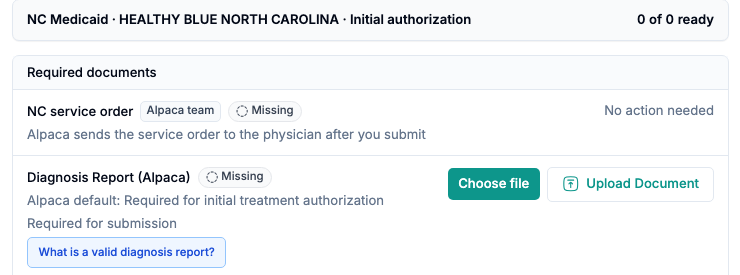
NC service order is marked Alpaca team. You don’t upload or sign it. The row reads No action needed, and says Alpaca sends the service order to the physician after you submit.
Diagnosis Report is required. Select Choose file or Upload Document.
Treatment Plan/Plan of Care must be Ready. If it isn’t, select Submit a New Treatment Plan.
Check the service codes read from the treatment plan, and fix any value that was misread.
3. Submit
Select Submit. It stays disabled until every required row is ready.
4. Follow the status
After you submit, the request shows Request Processing in the Prior Authorizations Requests table.

Alpaca sends the service order to the physician and collects the signed copy. Once it’s back, Alpaca submits the full request to the payer for you. The Packet column then shows Submitted with the date.
What you do next
Nothing, unless the status changes to Data Needed. Open the request, add the missing item, and submit again.
Common problems
What you see | What to do |
|---|---|
Submit is disabled | Open the packet. A required row, usually Diagnosis Report or the treatment plan, isn’t Ready. |
A message says an initial request already exists for this insurance card | Open the existing request instead of creating a second one. |
Request Processing for several days | The physician hasn’t returned the signed order yet. Contact Alpaca support and give the client and insurance card. |