Prepare a Colorado Medicaid 6-month reauthorization
Last updated: November 5, 2026
Health First Colorado (Colorado Medicaid) authorizes ABA for up to 6 months at a time, and every renewal is reviewed by Acentra. Acentra pends or denies a renewal when a document is missing, when an assessment or note is more than 60 days old, or when it can't see progress in charts and graphs. Alpaca turns those rules into one checklist, so you can see exactly what Acentra wants before you submit.
Three things to know up front:
Alpaca builds the paperwork from your own records. The progress report prints your program data and graphs exactly as recorded. Nothing is invented.
Warnings help you; they don't stop you. The checklist flags anything Acentra is likely to question, so you can fix it before Acentra sees it. You can always submit.
No parent signature is needed. Colorado doesn't ask for one on the renewal, and the progress report is signed by the BCBA alone.
Which requests this applies to
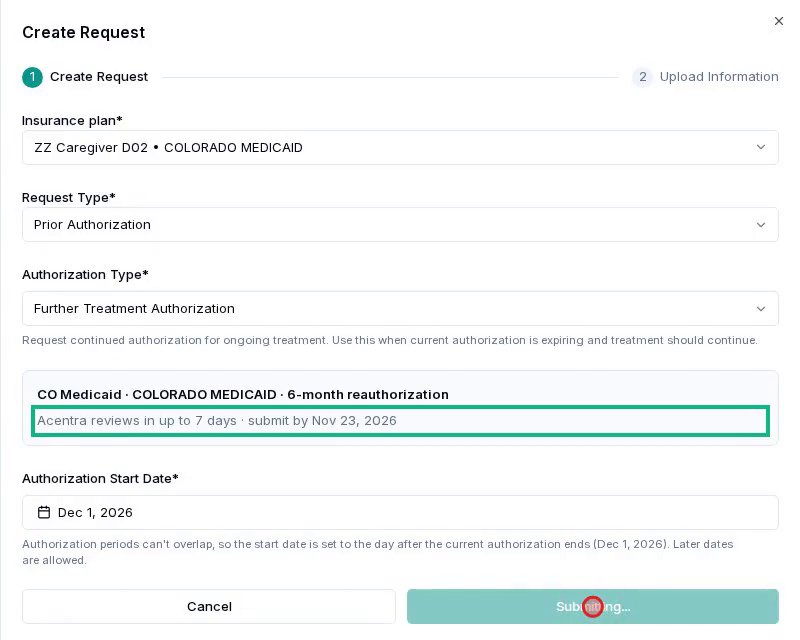
The checklist appears when you create a Further Treatment Authorization for a client whose insurance card is Colorado Medicaid. Alpaca shows CO Medicaid · 6-month reauthorization with two dates:
Submit by: 7 days before the current authorization ends. Acentra takes up to 7 days to review, longer if it asks for more information.
Start date: the day after the current authorization ends. Acentra doesn't accept dates that overlap the current authorization. The request covers up to 6 calendar months from that day.
Requests on Child Health Plan Plus (CHP+) and commercial cards are unchanged.
Who does what
Task | Who can do it |
|---|---|
Re-evaluation, CO Medicaid checklist, signing and finalizing the plan | The BCBA on the client's care team |
Generate and sign the CO progress report | A BCBA in your organization. Other staff see the report but can't generate or sign it. |
Create the request, add documents and submit | Anyone who can create prior authorization requests for the client |
Step 1: Prepare the re-evaluation (BCBA)
Open the client → Treatment Plans → your reassessment → Edit. A CO Medicaid checklist appears on the right. It lists what Acentra asks for and updates as you work. Each open item has a link that takes you to the step where you fix it.
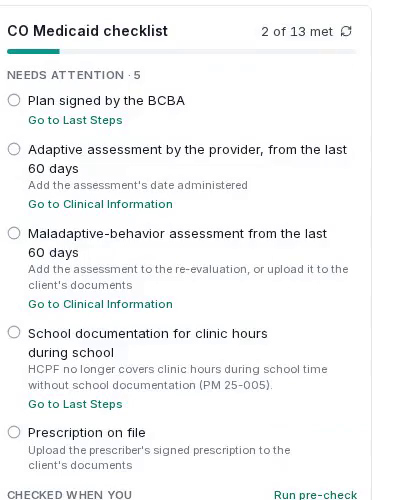
Assessments from the last 60 days. On Clinical Information, add the adaptive assessment (for example Vineland or ABAS), completed by your organization, and the maladaptive-behavior assessment. Upload each score report. On Edit Writeups, set the Date administered. Acentra asks for assessments from the last 60 days.
Graphs for every program. Acentra wants progress shown in charts and graphs. Parent-training programs don't need one.
A real discharge plan. On Looking Forward, write the discharge plan. The default "not able to be collected" text doesn't count.
Sign the plan on Last Steps.
Run the pre-check (Document Export → Generate Export, or Run pre-check on the checklist). It reads the plan for what Acentra's reviewers look for: change that lasts beyond the session, generalization at home and in the community, interventions for barriers to progress, interfering events, 6-month goals with discharge criteria, and a complete prescription. Its findings are suggestions. None of them blocks anything.
Finalize the plan. Back on Treatment Plans, click Finalize plan and confirm. Signing and exporting is not enough: the request counts the plan only once it's finalized.
Two items stay open on the checklist, and that's expected: School documentation and Prescription on file. You add those to the request in step 2.
Step 2: Create the request
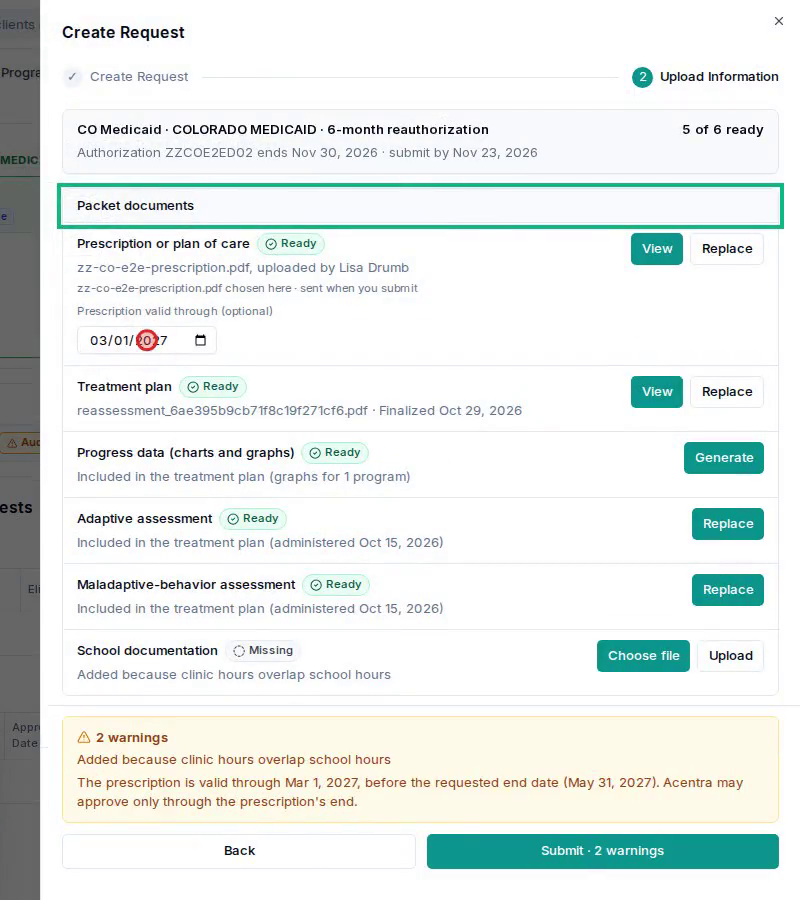
Go to the client's Care Readiness → Create Request. Pick the Colorado Medicaid card, Prior Authorization and Further Treatment Authorization, then Create. Alpaca shows one row for each document Acentra wants, and fills in what it already has.
Row | What to do |
|---|---|
Prescription or plan of care | Upload the prescription, approved and signed by the prescriber. Optionally enter Prescription valid through. If it ends before the requested end date, Alpaca warns you, because Acentra may approve only through the prescription's end. |
Treatment plan | Ready once the plan is finalized. Nothing to do. |
Progress data (charts and graphs) | Ready when the treatment plan has a graph for every program. If it doesn't, click Generate to make a CO progress report with a graph per program, then the BCBA clicks Sign. The row shows "Awaiting signatures · BCBA" until the BCBA signs. |
Adaptive assessment and Maladaptive-behavior assessment | Ready with the assessments from the treatment plan. Use Replace to attach a newer score report. Alpaca sends these score reports to Acentra with the plan. |
School documentation | Appears when your clinic hours overlap school hours. Health First Colorado no longer covers clinic hours during school time without school documentation (PM 25-005). Upload it here. |
Child and parent attendance logs | Recommended, not required. Click Generate to build them from your calendar and signed notes. |
The 60-day rule
Acentra asks for notes and assessments from the last 60 days. Each dated document shows its date, and Alpaca warns you when a document is more than 60 days old, or will be by the time Acentra reviews it. Replace it with a newer one, or submit and expect Acentra to ask.
Warnings you may see
None of these stops you from submitting.
Submit-by date. "Acentra takes up to 7 days to review…" appears once you're past the submit-by date.
Authorization already ended. Health First Colorado requires approval before services, so dates of service before approval may be denied as untimely.
Dates overlap. The requested dates overlap the current authorization.
Prescription ends early. The prescription is valid through a date before the requested end date.
Adaptive assessment not by the provider. The adaptive assessment must be completed by the behavioral therapy provider.
Age 21. Health First Colorado covers ABA for members under 21. You're warned if the member is 21 on the start date or turns 21 during the authorization.
No graphs. The progress data has no charts and graphs.
Step 3: Submit
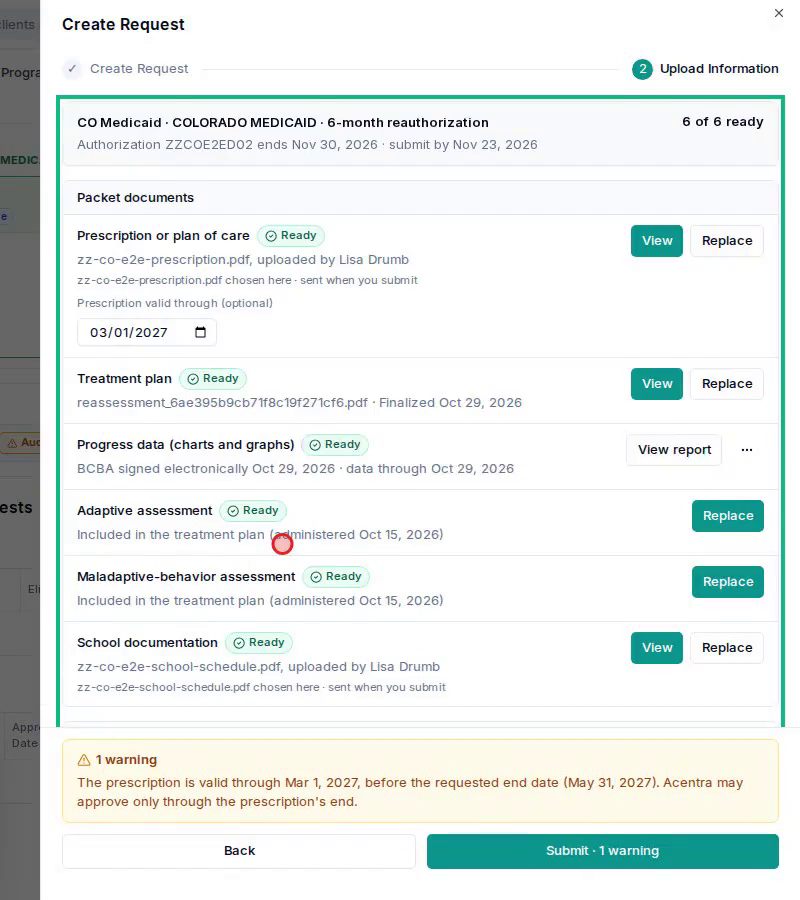
When every row you need is Ready, click Submit. Alpaca sends each document to Acentra with its right document type: the treatment plan, the assessments, the progress data, the prescription, the school documentation and the attendance logs. The request list then shows "CO · 6-month reauthorization · n of 6 ready · Submitted".
Tips
Plan the re-evaluation so its assessments are still inside the 60 days on the submit-by date.
If a row looks out of date right after you generate or sign something, give it a few seconds to refresh.
If you close the request before submitting, Alpaca asks before discarding files you chose.